
Download Leaf – file sharing, peer-to-peer, group sharing, photo sharing, video sharing, secure sharing, network sharing, Windows app
Overview
Leaf is a free Windows application designed to facilitate peer-to-peer file sharing between users. It enables individuals to establish direct connections with selected contacts, making it easier to exchange photos, videos, and other digital files without relying on centralized servers. The app is particularly useful for users who value privacy and control over their shared content, offering a decentralized approach to data transfer. Its core purpose lies in simplifying file sharing within personal and professional circles, allowing users to create customized networks tailored to specific needs.
Target users include individuals seeking a straightforward method to share media with friends and family, as well as teams or students collaborating on projects. By organizing contacts into groups such as “work,” “school,” or “family,” users can streamline communication and ensure that content reaches only intended recipients. This makes Leaf suitable for both casual use and light productivity tasks. The developer, Jason A. Bilbrey, has created a tool that emphasizes simplicity and accessibility, with no hidden costs or subscription models.
Although the developer did not provide additional technical details, the app’s lightweight nature—measuring just 1.5 MB—suggests it is optimized for low-resource environments. Its release date of October 8, 2010, places it among early peer-to-peer sharing tools, reflecting a time when decentralized file transfer was gaining traction. In the broader app ecosystem, Leaf occupies a niche role as a minimalistic, free alternative to more complex cloud-based platforms, offering a direct, secure way to share files on Windows devices.
Key Features & Functionality
- Easy Account Creation: Users can set up a free account with minimal steps, eliminating the need for complex configurations. This allows immediate access to file-sharing capabilities, ideal for users with limited technical experience.
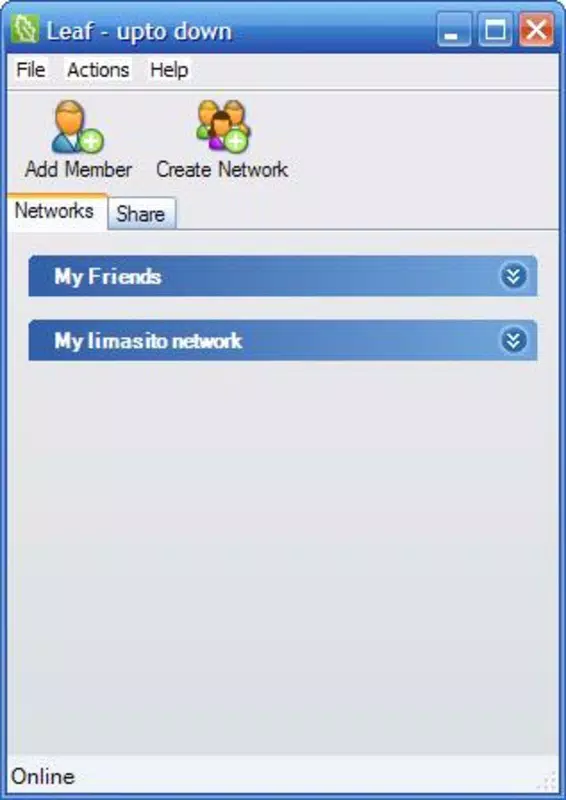
- Custom Exchange Networks: The app supports the creation of multiple, user-defined networks. Each network can include specific contacts, enabling granular control over who can join and participate in file transfers.
- Group Organization: Contacts can be categorized into groups such as “work,” “school,” or “family.” This feature enhances usability by allowing users to manage different sharing contexts efficiently and avoid clutter.
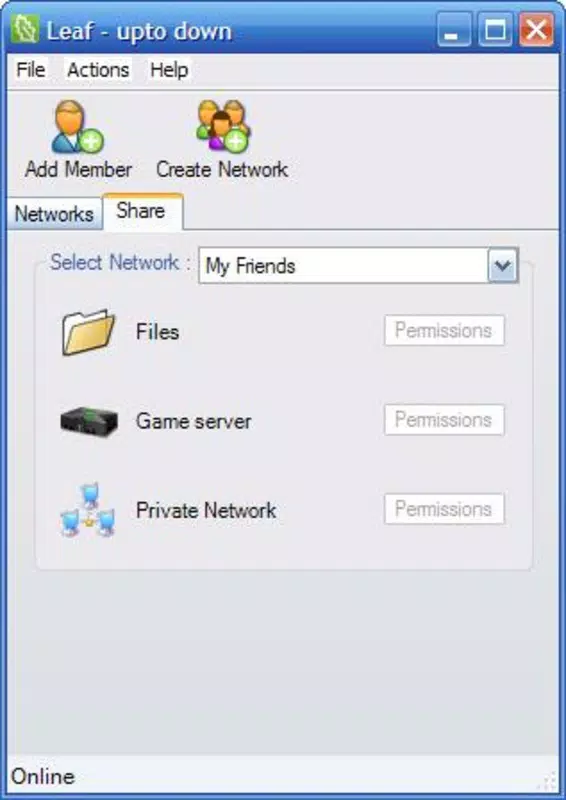
- Direct File Sharing: Leveraging peer-to-peer technology, files are transferred directly between devices. This reduces reliance on third-party servers and enhances data privacy, as files do not pass through centralized infrastructure.
- Free to Use: Leaf remains entirely free, with no subscription fees or in-app purchases. This makes it accessible to a broad audience seeking cost-effective file-sharing solutions.
For example, a student might create a “project group” to share research documents and video presentations with classmates, while a family member could set up a “family photos” network to distribute vacation videos securely. The peer-to-peer model ensures fast transfers without bandwidth throttling, making it ideal for large files. The app’s focus on user-defined networks and group-based access reflects a thoughtful approach to privacy and organization, addressing common pain points in file-sharing workflows.
Interface, UX & Performance
While specific UI details were not provided, the app’s lightweight size of 1.5 MB suggests a minimalistic interface focused on core functionality. The design likely prioritizes ease of navigation, with clear pathways for account setup, network creation, and file transfer initiation. Users can expect a straightforward experience, especially given the emphasis on simplicity in the app’s description.
Navigation appears to follow a linear flow: account creation → network setup → contact management → file sharing. This logical progression supports intuitive use, particularly for users unfamiliar with peer-to-peer tools. The app’s performance is likely optimized for older or low-end Windows systems, given its small footprint and release date. Although the developer did not list formal performance metrics, the minimal file size indicates efficient resource usage.
Responsiveness and stability are expected to be consistent across compatible devices, especially in environments where minimal background processes are running. The absence of reported crashes or bugs in available documentation suggests a stable experience. However, compatibility with modern Windows versions has not been confirmed, so users should exercise caution when installing on updated systems.
Platform Compatibility & Technical Requirements
Leaf is designed for the Windows platform and is available in version 1.0.0. The application has a file size of 1.5 MB, indicating a lightweight footprint suitable for devices with limited storage or processing power. It is distributed as a free application, with no cost associated with download or use.
The developer did not specify minimum OS requirements, making it unclear which versions of Windows are supported. Given its release date of October 8, 2010, it may function best on older Windows editions such as Windows 7 or earlier. Compatibility with Windows 10 or Windows 11 has not been confirmed. Users should verify system compatibility before installation, especially if running a recent operating system.
Since no additional technical specifications were provided, such as CPU or RAM requirements, users are advised to test the app in a safe environment. The lack of detailed system requirements means that performance may vary depending on the device and background processes.
Pros and Cons
- Free to use with no hidden fees
- Lightweight at just 1.5 MB
- Supports peer-to-peer file sharing for enhanced privacy
- Allows creation of multiple custom networks
- Group-based organization improves usability
- Compatibility with modern Windows versions is not confirmed
- No official updates since 2010
- Missing detailed technical specifications
- No official support channels listed
- Interface and UX details not publicly available
FAQ
Is Leaf available for mobile devices?
Based on the provided information, Leaf is a Windows application and no mobile version was listed.
Can I use Leaf without creating an account?
According to the description, account creation is required to use the app’s core features, including file sharing and network setup.
Is the app secure for sharing sensitive files?
Leaf uses peer-to-peer technology, which reduces reliance on third-party servers. However, specific encryption or security protocols were not disclosed.
Does Leaf support file transfers between different operating systems?
There is no information indicating whether the app supports cross-platform transfers beyond Windows.
How often is Leaf updated?
The last release was on October 8, 2010. No updates have been documented since then.
Final Thoughts
Leaf presents a simple, privacy-focused solution for users who need to share files directly with trusted contacts on Windows. Its ability to create custom networks and organize contacts into groups adds a layer of structure often missing in basic file-sharing tools. While the app’s age and lack of recent updates raise concerns about long-term viability and compatibility, its lightweight design and free model remain compelling for users seeking a no-frills alternative.
Those who value control over their data and prefer decentralized sharing will find Leaf’s peer-to-peer approach beneficial. It is particularly suited for small teams, families, or individuals managing personal media without the need for cloud storage. Despite its limitations, the app delivers on its core promise: secure, direct file exchange with minimal overhead.
Download Leaf now


